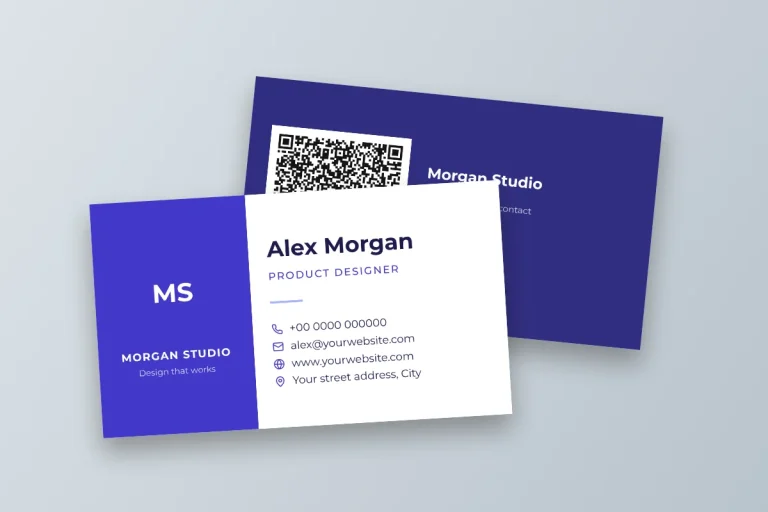
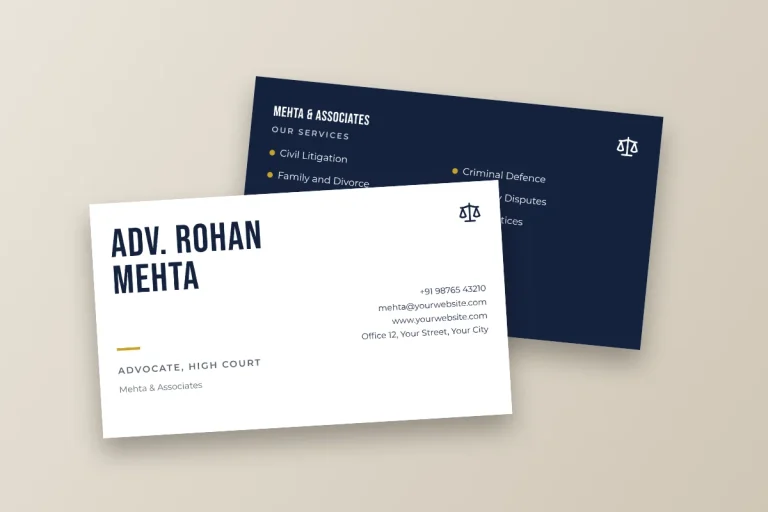
What to Put on a Business Card: 12 Essentials
Put your name, job title, company, phone number, email and website on a business card. Add a logo, address, QR code or licence number only when they help someone contact or trust you.
A business card should carry your name, job title, company name, phone number, email address and website. Those six items let someone remember who you are and reach you. Everything else (logo, address, social handle, QR code, tagline, registration number) is optional and depends on your work and your country.
Below is the full checklist of 12 essentials, a visiting card format you can copy, what to leave off, how to split details between the front and back, and the licence or registration numbers that matter for some professions in India and the US. When you are ready, pick a template on this page and replace the placeholder details in our free business card maker.
The 12 business card essentials (checklist)
| # | Item | Must have? | Tip |
|---|---|---|---|
| 1 | Your name | Yes | The largest text after the logo. Use the name people will say when they call. |
| 2 | Job title or profession | Yes | "Advocate", "Interior Designer", "Sales Manager". One line. |
| 3 | Company or shop name | Yes, if you have one | Freelancers can use their own name as the brand. |
| 4 | Logo | Recommended | Use a high-resolution file; a blurry logo looks worse than none. |
| 5 | Phone number | Yes | Include the country code (+91, +1) if you deal with people abroad. Mark WhatsApp if you use it for business. |
| 6 | Email address | Yes | An address on your own domain looks more established than a free webmail address. |
| 7 | Website | Recommended | Drop "https://" and "www." if space is tight. |
| 8 | Address | Depends | Essential for shops, clinics and offices that customers visit. Optional for remote work. |
| 9 | Social media handle | Optional | One or two channels you actually use, not every icon. |
| 10 | QR code | Optional | Link to a contact card (vCard), a website or a map. Print it at least 0.8 x 0.8 in (about 2 x 2 cm). |
| 11 | Tagline or services | Optional | A short line or a short list of services, usually on the back. |
| 12 | Licence or registration number | For some professions | Enrolment, registration, RERA, GSTIN or FSSAI numbers where relevant (see below). |
A simple visiting card format you can copy
Most good cards follow the same order, from most to least important. Here is a standard layout for a horizontal 3.5 x 2 inch card:
- Top left or center: logo and company name.
- Middle: your name in the largest type, with your title directly underneath in a smaller, lighter weight.
- Bottom block: phone, email, website and address, one per line, aligned to the same edge.
- Back: logo on a solid color, or services, a QR code and a short tagline.
Sample text layout:
- Priya Mehta
- Senior Interior Designer
- Mehta Studio
- +91 98XXX XXXXX | priya@example.com
- www.example.com
- Office address, City, PIN
Keep all text at 8 pt or larger and inside the safe zone, at least 0.125 inch from the cut edge. Our business card size guide explains trim, bleed and safe zone in detail.
Front vs back: how to split the information
A double-sided card gives you room to breathe. A practical split:
- Front: name, title, company, phone, email, website. Everything someone needs to contact you without turning the card over.
- Back: logo, tagline, list of services, branch addresses, opening hours, a map QR code or a QR code that saves your contact.
In India it is common to print an English front and a Hindi, Gujarati or other regional-language back, which our maker supports for Hindi and Gujarati. In the US, single-sided cards are still common, but a back with a QR code or appointment space is increasingly popular. See our QR code business card templates for layouts that put the code on the back. Most phones read a vCard QR code as a "save contact" prompt, so the person does not have to type your number.
Registration and licence numbers by profession
Some professions should show a registration number, and a few have rules about what they may print. Rules change, so check the current guidance from your regulator.
India
- Advocates: Bar Council of India Rule 36 says an advocate "shall not solicit work or advertise, either directly or indirectly." Visiting cards are not specifically addressed, so keep them plain and factual: name, "Advocate", enrolment number, court, address and contact details. See advocate visiting card designs.
- Doctors: the 2002 Indian Medical Council regulations (currently applicable) require the registration number on prescriptions, certificates and receipts and allow it on sign boards. Cards are not specifically addressed, but printing the registration number and State Medical Council is common and sensible. See doctor visiting card templates.
- Real estate agents: the RERA Act 2016 requires agents to register with the state RERA authority and to quote the registration number in every sale they facilitate. Showing it on the card makes sense. See real estate visiting cards.
- Chartered accountants: ICAI encourages members to use the official "CA India" logo, unaltered, on visiting cards; firms may not use their own logos or monograms.
- Architects: only persons registered with the Council of Architecture may use the title "architect".
- Food businesses and caterers: the 14-digit FSSAI number is not required on visiting cards, but many caterers print it.
- Any registered business: the GSTIN is a 15-character alphanumeric number. Many traders print it on the back.
- LIC agents: LIC has warned that its logo cannot be used without prior permission, so do not add it unless LIC has authorized you.
United States
Many licensed trades and professions print their license number. For lawyers, ABA Model Rule 7.1 says a lawyer "shall not make a false or misleading communication about the lawyer or the lawyer's services," and professional designations count as communications. State rules vary, so check yours.
What to leave off a business card
- Outdated details: an old number or a closed branch. Reprint instead of crossing out.
- Every phone number you own: one mobile and one office line at most.
- Too many social icons: pick the one or two you check.
- Unverifiable claims: "best in city" or "No. 1" undermine trust, and for advocates or doctors may go against professional rules.
- Logos you are not authorized to use: brand, party or institution logos need permission.
- Personal details: home address or date of birth, unless you work from home and customers visit.
- Tiny text: if it is below 8 pt, it is probably too much information. Move it to the back or your website.
Final check before you print
- Call the phone number and send a test email to the address on the card.
- Open the website and scan the QR code with two different phones.
- Check spelling of your name, title and street name, and the digits of any registration number.
- Ask someone else to read the card in five seconds and tell you what you do.
- Confirm the size and bleed with your printer, then download the print-ready PDF.
For layout and color ideas once the content is settled, read our business card design ideas.
Frequently asked questions
What information should be on a business card?
At minimum, put your name, job title, company name, phone number, email address and website. Add a logo, office address, one social handle or a QR code if they help people reach or remember you. Some professions also print a registration or licence number, such as an advocate's enrolment number.
Should I put my address on a business card?
Put your address on the card if customers visit you, for example a shop, clinic, salon or office. If you work remotely or from home and do not receive visitors, the city name is enough. Many Indian shops print the full address with a nearby landmark on the back.
What is the correct visiting card format?
A common visiting card format is logo and company name at the top, your name in the largest type in the middle with your designation below it, and phone, email, website and address in a neat block at the bottom. The back can carry services, a tagline or a QR code.
Should a business card have a QR code?
A QR code is optional but useful. A vCard QR code lets someone save your contact with one scan, and a link QR code can open your website or map location. Print it at least 0.8 x 0.8 inch (about 2 x 2 cm) with a blank margin around it.
Should I print my GST number on a visiting card?
It is not required, but many Indian traders and suppliers print their 15-character GSTIN on the back of the visiting card because business customers ask for it when billing. Double-check every character before printing, since a wrong GSTIN causes invoice problems.
Sources
Related
- Business Card SizeThe standard business card size in the US and Canada is 3.5 x 2 inches (88.9 x 50.8 mm). Below: every common...
- Business Card Design Ideas and TipsThe best business card design ideas come from one strong decision: a bold layout, a distinctive typeface, a...
 QR Code Business Card TemplatesA QR code business card lets people scan the back of your card and save your name, phone and email straight...
- Advocate Visiting Card DesignPlain, dignified advocate visiting card designs with room for your enrolment number, court and chamber...